
Per-app settings
On Windows, any edge or corner can do something else while a particular app is the window in front. For example, the bottom edge can seek in your video player, switch tabs in your browser, and switch virtual desktops everywhere else.
#Setting it up
- Open the settings window (left-click the tray icon).
- Next to Settings for, click Add an app… and pick the app's program, for example
vlc.exeorchrome.exe. - With that app chosen in the list, click an edge or corner on the map.
- Tick Different in vlc (the box is named after the app), then choose what that section does in this app.
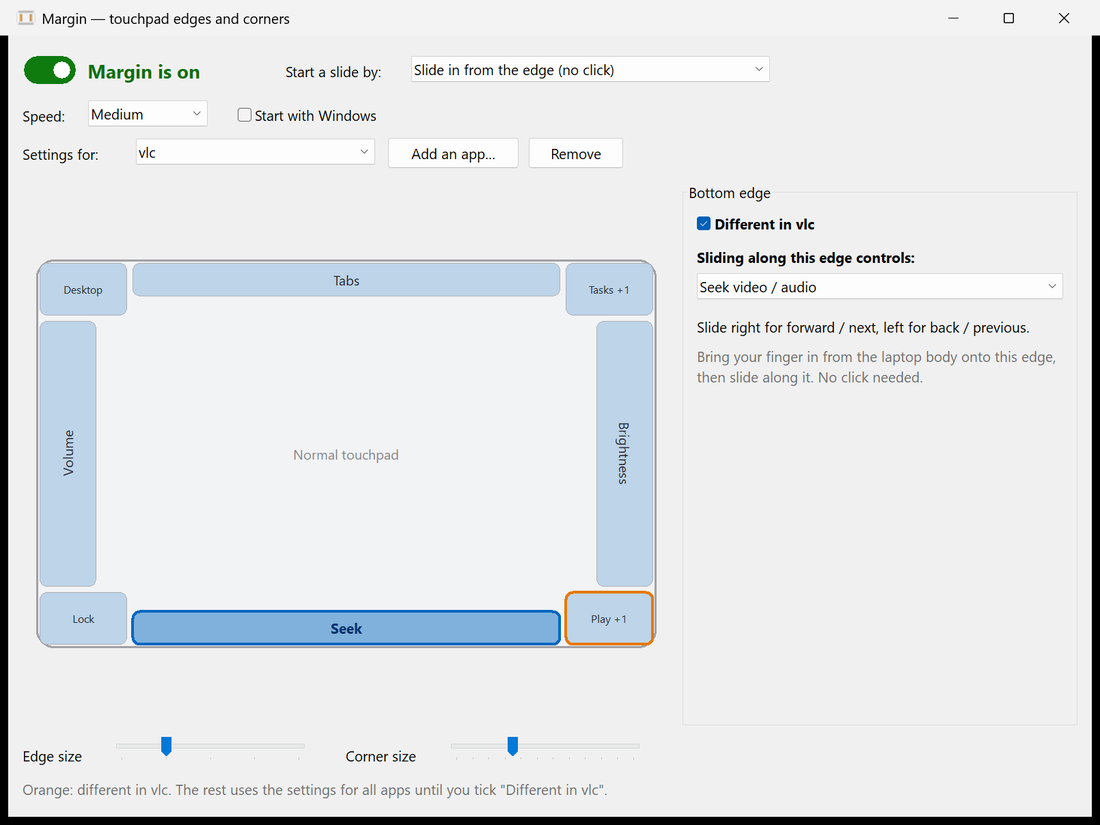
Sections that are different for the chosen app have an orange outline on the map. Every other section follows the settings for All apps: while the box is unticked, the editor shows those settings greyed out. Untick the box to make a section follow all apps again. Remove deletes the app's settings.
The switches at the top (on/off, how a slide starts, speed, zone sizes) are shared by all apps.
#How Margin picks the settings
Margin watches which window is in front. When a slide or a corner press starts, it uses that app's settings, and a slide keeps them until you lift your finger, even if it switches to another app on the way (as Alt+Tab does). Margin's own settings window doesn't count as an app, so you can keep it open while trying things.
Apps are matched by program name, without the folder or .exe, and case doesn't matter: C:\Program Files\VideoLAN\VLC\vlc.exe is vlc. To see what Margin thinks is in front, run margin.exe --diag: it prints a line such as front app: vlc (its own settings) each time the window in front changes.
#In settings.json
Per-app settings are kept under apps. Each entry names the program and lists only the sections that are different; see Settings file.
"apps": [
  {
    "app": "vlc",
    "sections": {
      "bottom": { "slide": "seek" },
      "bottomLeft": { "clicks": [ { "do": "playPause" } ], "longPress": { "do": "mute" } }
    }
  }
]#Linux
Linux keeps per-app settings in the file but doesn't use them yet, because Wayland has no common way to tell which app is in front. The settings for all apps apply there, and the settings page leaves the apps list as it is when it saves.