
Margin
Your touchpad has edges. Put them to work.
Slide along an edge for volume, brightness, seeking or Alt+Tab. Press a corner to run anything. You choose what each one does, and the middle stays a normal touchpad. Free and open source, for Windows and Linux.
irm https://raw.githubusercontent.com/arxhr007/margin/main/scripts/install.ps1 | iexWindows 10/11 with a precision touchpad · margin.exe (0.6 MB) · Linux
What it does
The strip around your touchpad, turned into controls you pick.
Slide an edge
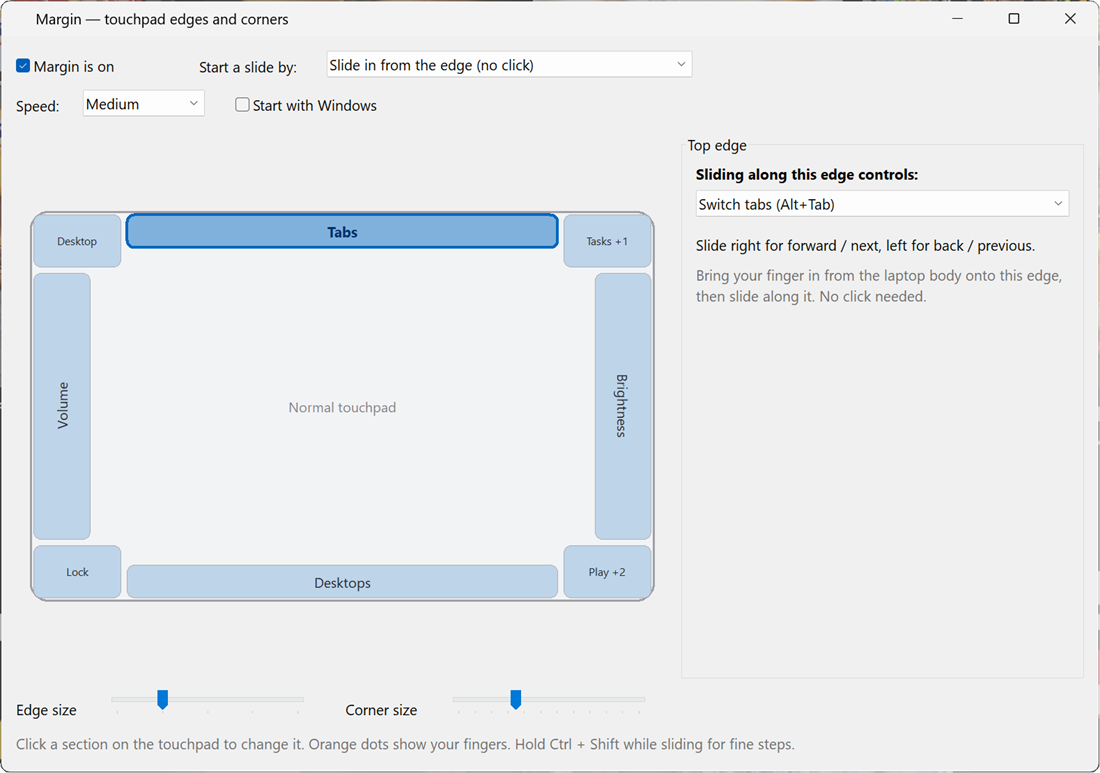
Volume, screen brightness, seeking a video, zoom, switching windows or virtual desktops, skipping tracks, or your own shortcut.
Press a corner
One, two or three presses each run a different action: mute, screenshot, lock, open an app or website, press a shortcut, run a command.
You choose
Click an edge or corner on the touchpad map and pick what it does. The map always shows the real zones.
Stays out of the way
Taps, palms, scrolling and multi-finger gestures pass through. The middle of the touchpad stays a normal touchpad.
Tiny and native
One program of about 0.6 MB, nothing else to install. Windows 10/11 and Linux, Wayland or X11.
Private
No network access, no telemetry, no account. It reads the touchpad and saves your settings, nothing more.
Quick start
Install, then left-click the tray icon (Windows) or run margin settings (Linux).
# Windows 10 / 11, in PowerShell
irm https://raw.githubusercontent.com/arxhr007/margin/main/scripts/install.ps1 | iex# Linux (x86_64, systemd)
curl -fsSL https://raw.githubusercontent.com/arxhr007/margin/main/scripts/install.sh | shDocumentation
From the first slide to editing settings.json by hand.
Download
Windows and Linux downloads, checksums and code signing.
Install
One-line installers, options, building from source, uninstalling.
Using Margin
Edges, corners, the two ways to start a slide, and the defaults.
Custom keys
Send your own shortcuts from an edge, with presets.
Settings file
settings.json by hand: every field and value.
Linux
The service, permissions and what differs from Windows.
Troubleshooting
When a slide or press does nothing, and other fixes.
How it works
Raw Input, evdev, the gesture engine, building and testing.
Code signing policy
How Windows releases are built and signed.
Privacy policy
Margin collects nothing; what it stores on your computer.