
Reference
Custom keys
Choose Custom keys… for an edge to make it send your own shortcuts. (The ready-made Switch tabs (Alt+Tab) entry is fixed; its Change the keys… button turns it into Custom keys, starting from Alt+Tab.)
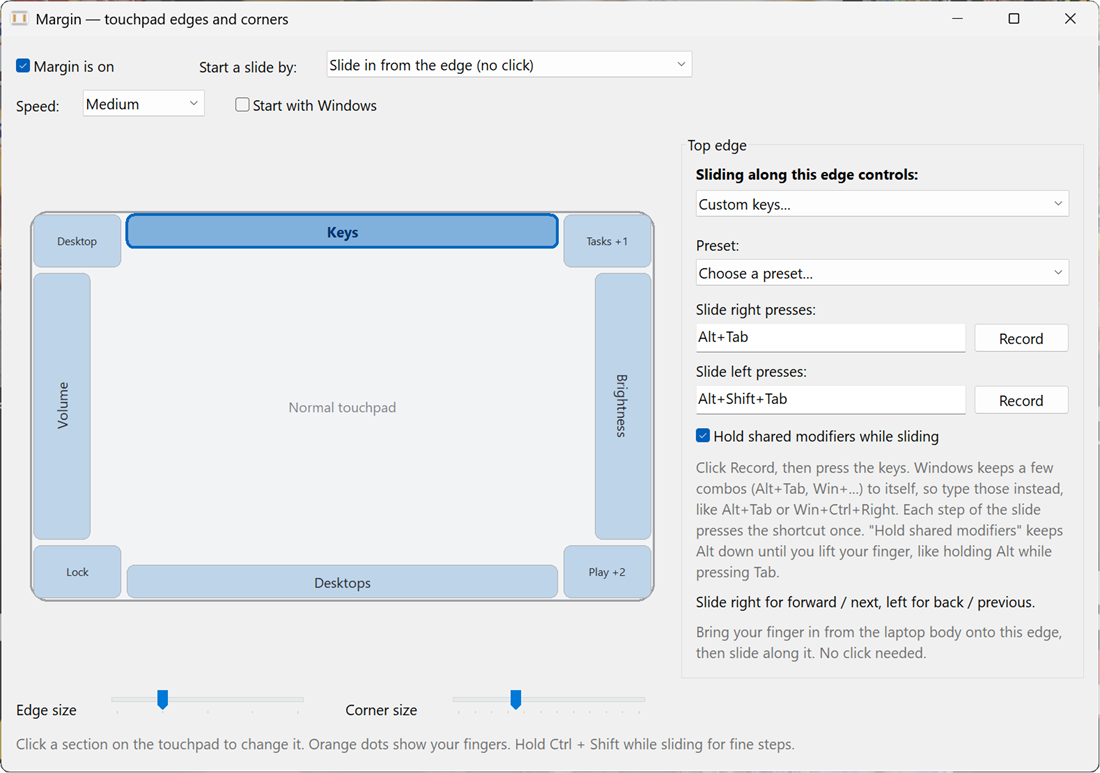
#Setting a shortcut
- Pick a preset, or click Record next to Slide right presses and press the keys.
- Do the same for the other direction.
- Tick Hold shared modifiers while sliding for Alt+Tab-style pickers: the modifiers both shortcuts share (Alt) stay down until you lift your finger.
#Shortcuts the system keeps
Your system keeps a few combinations to itself (Alt+Tab, anything with the Windows or Super key), so the Record button can't capture them. Type them in the box instead. Shortcut text looks like Ctrl+Shift+Tab, Alt+Tab, Win+Ctrl+Right (Win is the Super key on Linux), Ctrl+PageDown or F11.
#Presets
| Preset | Slide right / up | Slide left / down | Hold |
|---|---|---|---|
| Switch windows | Alt+Tab |
Alt+Shift+Tab |
yes |
| Switch browser tabs | Ctrl+Tab |
Ctrl+Shift+Tab |
no |
| Next / previous tab | Ctrl+PageDown |
Ctrl+PageUp |
no |
| Scroll | PageUp |
PageDown |
no |
| Arrow keys | Right |
Left |
no |
| Redo / undo | Ctrl+Y |
Ctrl+Z |
no |
Edit this page on GitHub
Margin 0.4.0 · MIT licence · made by Aaron Thomas