I Made My Laptop's Light Bar Show What Claude Code Is Doing
I Made My Laptop's Light Bar Show What Claude Code Is Doing
It has been a while since I built something just for fun, so I did. My ASUS ROG Zephyrus G14 has a light bar on the lid, and I wanted it to be useful instead of just pretty. The result is a small plugin called rog-slashbar. It turns the bar into a live dashboard for Claude Code. The code is open source at github.com/arxhr007/rog-slashbar.
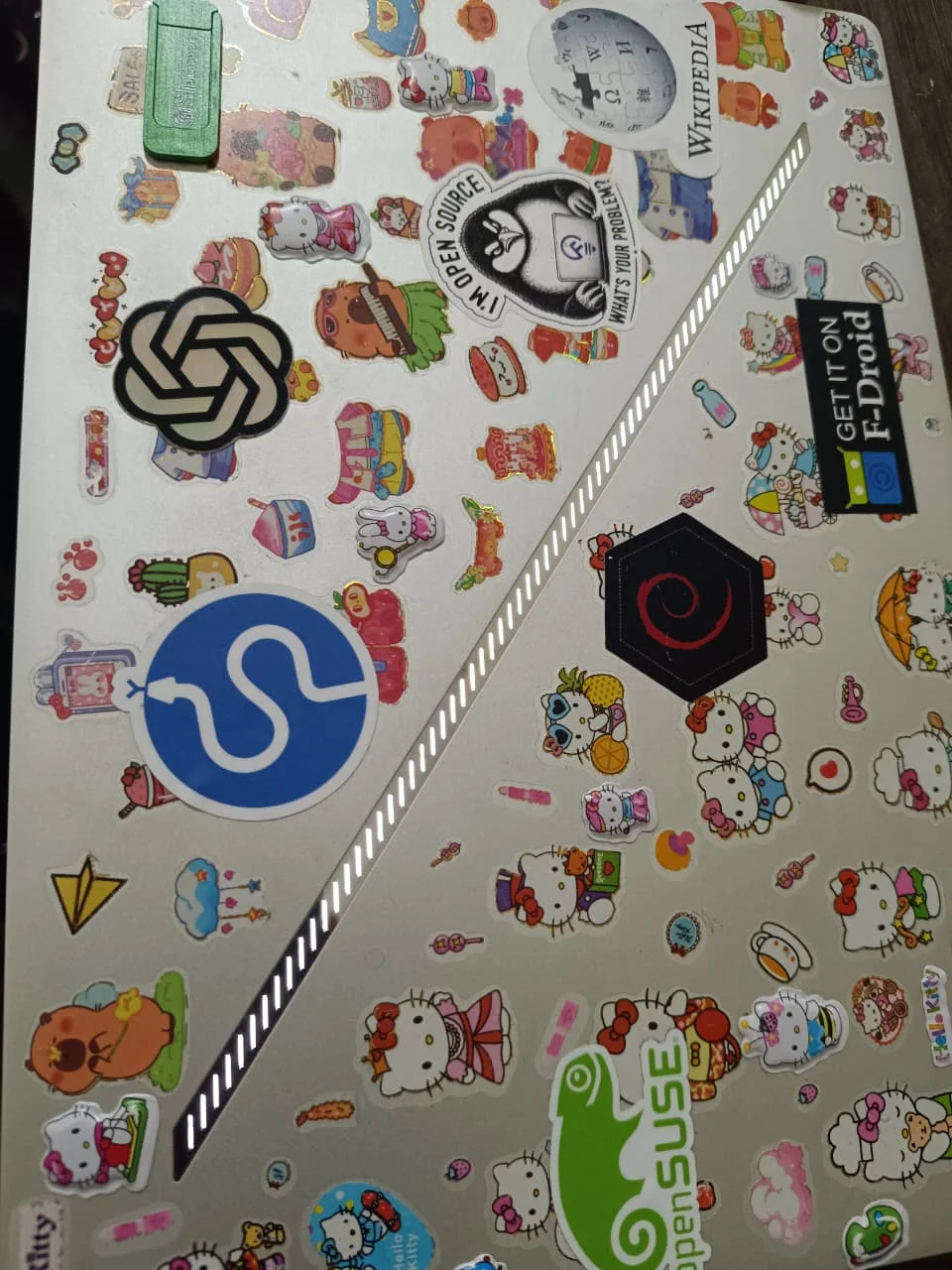
That is my actual laptop, stickers included. The diagonal strip is the Slash light bar.
What it does
The bar has three jobs.
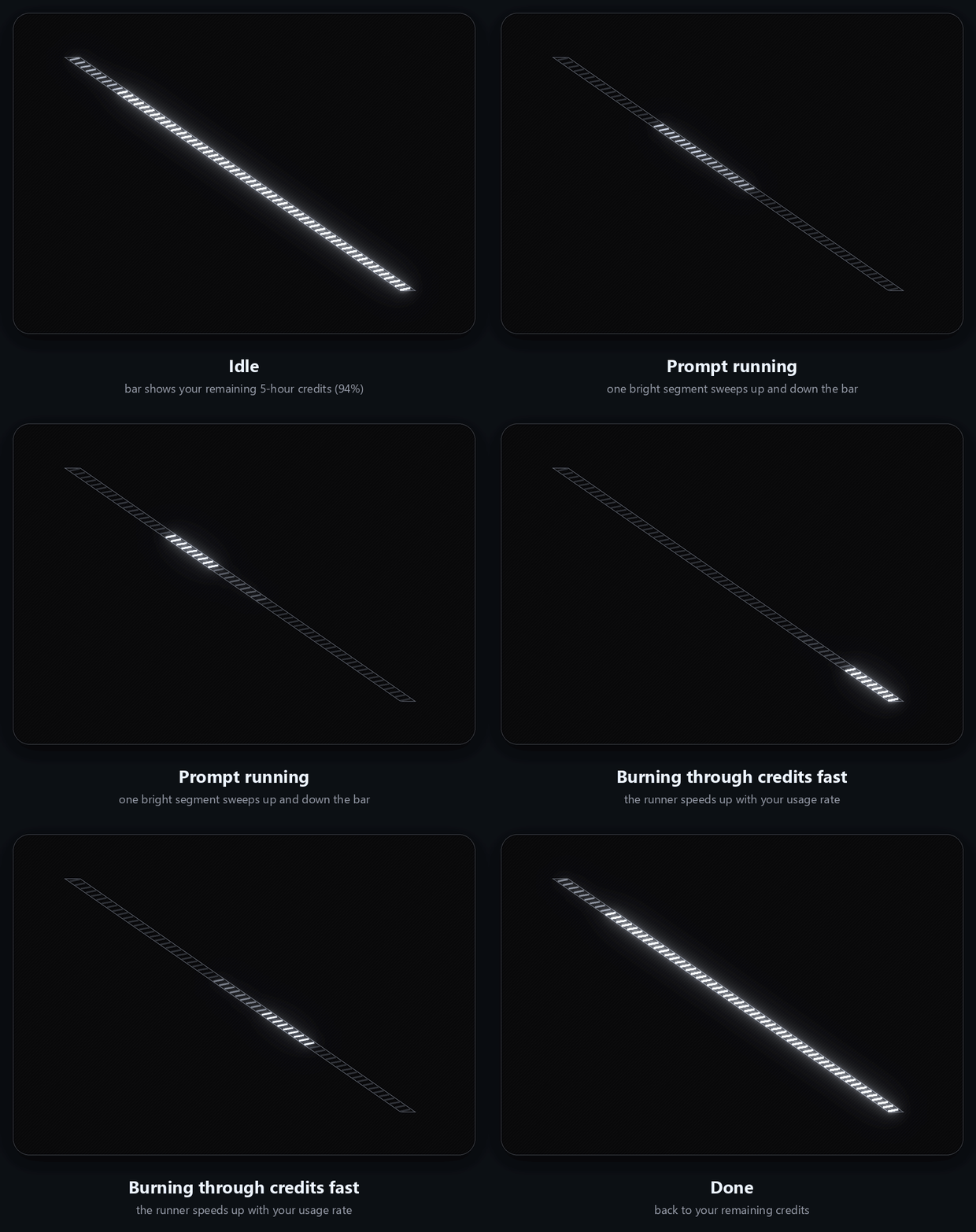
- When nothing is happening, it shows how much of my 5 hour usage limit is left. A full bar means plenty left, and the lights go out from the top left as I use it up.
- While a prompt is running, one bright segment sweeps up and down the bar. It moves faster when I am using my limit faster.
- When Claude needs me, because of a permission prompt, a question or a plan to approve, the whole bar blinks until I answer.
The third one is the reason I built it. I no longer have to keep checking the terminal to see if Claude is waiting for me.
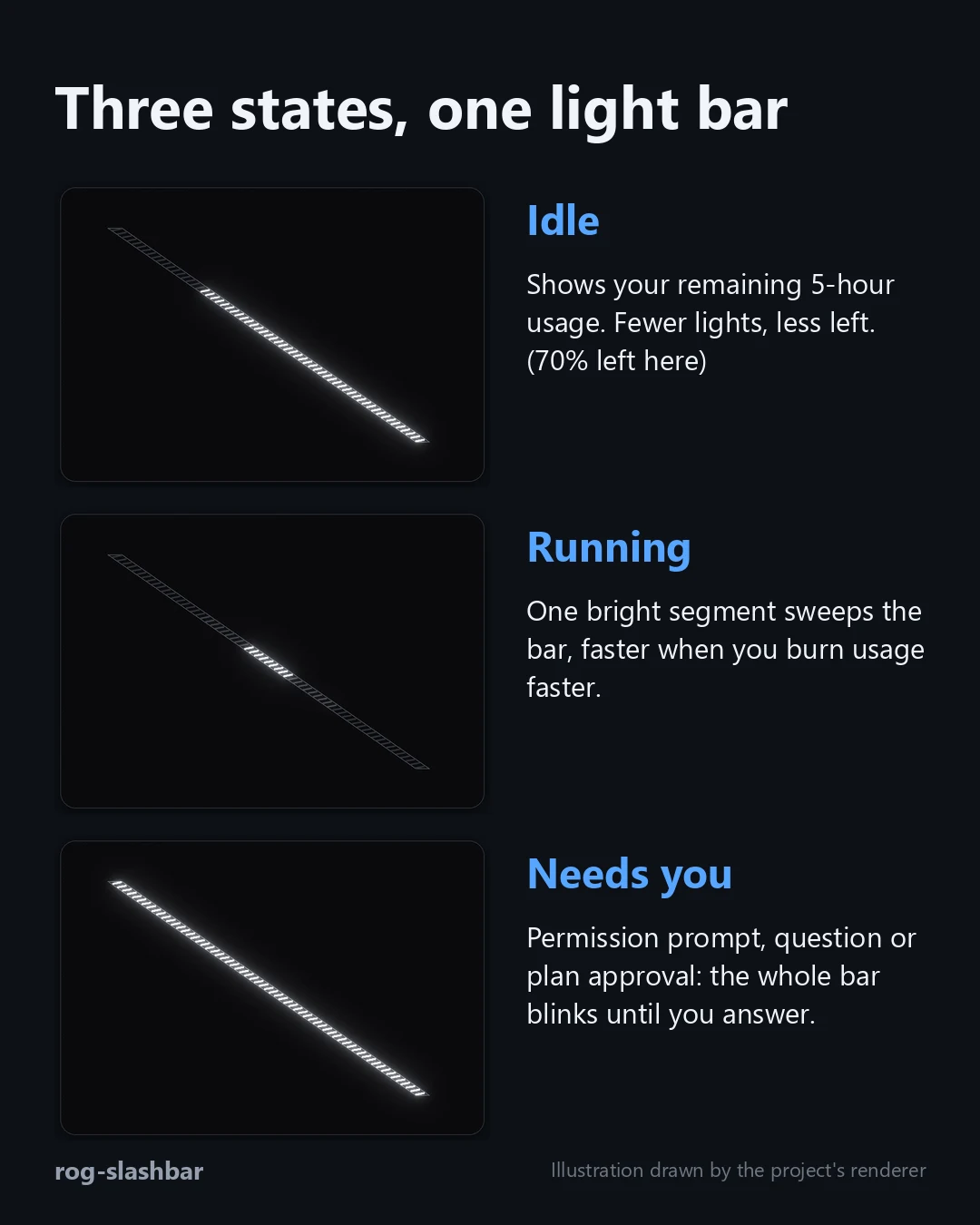
The pictures in this post other than the laptop photo are illustrations drawn by the project's own renderer, so they show the logic and not footage of the real bar.
The hardware
The bar looks like a strip of 63 small lights. They are grouped into 7 segments of 9, and the hardware can only set a whole segment at a time. I cannot light a single dash. So every effect is built from 7 brightness values, and that turned out to be a good constraint to design around. A sweep is just a bright segment moving across seven positions.
I did not work out the protocol myself. It comes from G-Helper, an open source tool for ASUS laptops, whose author already reverse engineered how the Slash is controlled. I read their SlashDevice.cs and rebuilt the same commands in my own code. That is also why rog-slashbar is licensed GPL 3.0.
Talking to the device
The bar is a USB HID device. On my G14 it is vendor 0x0B05, product 0x19B6. Another product ID, 0x193B, uses a different report ID, so the code knows both. Windows exposes several HID interfaces for the laptop, and only one of them accepts the bar's commands, the one on usage page 0xFF31. So the program opens every interface with the right vendor and product, sends a wake string to each, and keeps the first one that accepts it.
Every command is a 128 byte feature report. Byte 0 is the report ID (0x5D on my model), then the command bytes, then zero padding.
fn packet(report_id: u8, cmd: &[u8]) -> [u8; 128] {
    let mut p = [0u8; 128];
    p[0] = report_id;
    p[1..1 + cmd.len()].copy_from_slice(cmd);
    p
}
After the wake string ("ASUS Tech.Inc.") there is a fixed init sequence that switches the bar from its built in animations to a custom pattern:
C2
D1 01 00 01
D7 00 00 01 AC
D2 02 01 08 AB
D8 02 00 01 00              enable
D3 03 01 08 AB FF 01 01 06 FF FF 00
D2 02 01 08 AC              custom pattern header
D3 03 01 08 AC FF FF 01 05 FF FF
D4 00 00 01 AC
I do not know what every byte means. I copied the sequence from G-Helper and it works, which is not the same as understanding it. After that, a frame is simple: D3 00 00 07 followed by seven bytes, one brightness from 0 to 255 per segment. To turn the bar off I send a frame of zeros and then D8 02 00 01 80.
Two small details keep it reliable. The same frame is resent every 10 seconds as a keep alive, and if a write fails the driver drops the device and tries to reconnect every 5 seconds.
How it is built
Only one program ever touches the device.
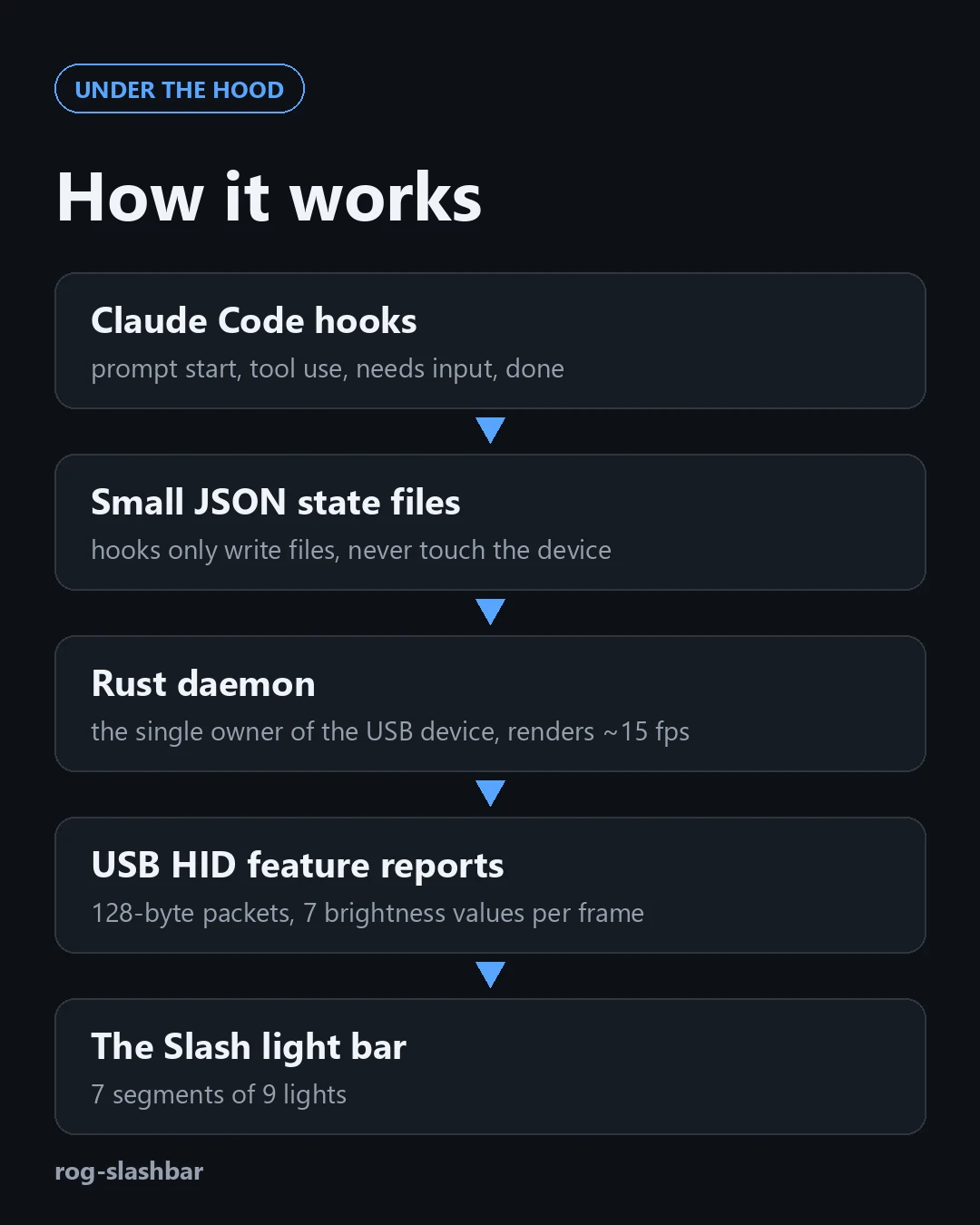
Claude Code runs hooks at moments like session start, prompt submit, tool use, a permission request and when a reply finishes. My hooks do almost nothing. They run the same executable with a state name, and it writes a small JSON file with the state and a timestamp. The files live in ~/.claude/slash/ and every write is atomic, so the daemon never reads half a file. The status line does the same for usage. Claude Code pipes it a JSON blob with the 5 hour and 7 day rate limits and the context window, and it saves them, prints a short line like 5h:94% 7d:65% ctx:82% burn:0.3%/m, and works out the burn rate as percent used per minute over the last 10 minutes.
A background daemon owns the device. It takes a lock on daemon.lock so a second copy exits straight away. About 15 times a second it reads the state files and calls the render function, which takes the current time and the files and returns 7 numbers between 0 and 1. It has no side effects, so I could test it without any hardware.
The rules are short.
- Idle shows the credits. With
leftpercent remaining,filled = left / 100 * 7, and segmentigetsclamp(filled - i, 0, 1). Below 10 percent the first segment also blinks. - Running is a triangle wave. The runner position is
(1 - abs(2 * phase - 1)) * 6, and segmentigetsclamp(1 - abs(i - position) / 1.3, 0, 1). A full pass takesclamp(1.8 / (1 + 1.5 * burn), 0.4, 1.8)seconds, so it runs at 1.8 seconds when I am calm and 0.4 seconds when I am burning usage fast. - Needs input turns all 7 segments on and off together, twice a second.
The last step reverses the order, because data index 6 is the end of the bar I treat as the start of the fill.
Because the files carry timestamps, states expire by themselves. Running lasts at most 3 minutes and the blink at most 90 seconds. That matters because pressing Esc to interrupt Claude fires no hook at all, so without an expiry the animation would run forever. The daemon exits when it sees a session end, or after 20 minutes with no updates, and it turns the bar off on the way out.
One more detail came from watching it. Claude Code sends a "still waiting for your input" notification about a minute after it finishes a reply. If I treated that as needs input, the bar would start blinking for no reason. The hook ignores it, and only permission prompts, the ask question tool and plan approval count.
Mistakes I made along the way
Most of what I learned came from getting things wrong, so here is the honest list.
The first version stayed dark. My first test was a Python script using hidapi. It ran with no error and the bar did nothing. The Python binding does not raise an exception when a write fails. It returns -1, and I was not checking it. I was also writing to the wrong HID interface, so every write failed quietly. Once I checked every return value and tried each interface until one accepted the wake string, the bar lit up. In the Rust version a failed write is an error I cannot forget to look at.
I got the shape of the bar wrong. My first animations treated it as a row of single lights I could control one by one. The real strip is diagonal, and the hardware only controls 7 whole segments of 9 lights. A photo of the real lid showed me that, and I redrew all the animations.
I got the direction wrong, twice. The credits drained from the wrong end of the bar, and my first fix was wrong as well. The bar should stay lit from the bottom right and go dark from the top left. In the data that is index 6, which is why the last step of the renderer reverses the array.
My hooks never ran. Claude Code runs hook and status line commands through Git Bash on Windows, and Git Bash strips backslashes. A path like C:\Users\me\x.exe turned into nonsense and nothing happened, with no error. Forward slashes fixed it.
The Rust daemon quit instantly. I opened the lock file in append mode, and on Windows a file lock needs read and write access. The lock call failed, the daemon thought another copy was running, and it exited. I also now log the difference between "someone else holds the lock" and a real error.
I could not kill the old daemon. After renaming a running exe to replace it, I looked for the process by the new name. A renamed running process keeps its original name, so the old daemon kept running and fighting over the device. This is also why the plugin updates itself by renaming the old file aside, copying the new one in and cleaning up later. Windows lets you rename a running exe but not overwrite it.
My first plugin design downloaded the executable. It fetched the program on first run. That needs network access and would not pass the plugin review rules for hook commands. Version 0.2.1 bundles the executable inside the plugin and makes no network requests at all.
Nothing animated until the status line was set up. This one I only found while testing a fresh install from GitHub. With no usage data yet, the renderer returned a single faint segment at 15 percent brightness, whatever the state. So the running sweep and the blink were both invisible on a new install. Version 0.2.2 fixes it, and I added a test for the no data case.
The rotating view was confusing. At first the bar cycled between the 5 hour limit, the 7 day limit and the context window. It looked cool and told me nothing at a glance. The default is now just the 5 hour credits, and the rest is one command away. I also removed the dim credits bar behind the running sweep, because a single moving segment on a dark bar is easier to see.
The GIFs looked wrong. My first renders made neighbouring segments blur into each other and mid grey posterized. A gentler glow, a display gamma of 1.9 and a dedicated brightness palette fixed it.
Packaging it as a plugin
I wanted installing to be easy, so it is a Claude Code plugin. The hooks call the bundled executable through ${CLAUDE_PLUGIN_ROOT}. On every session start the program copies itself to a fixed place in your home folder, so the status line path survives plugin updates. A plugin cannot set the status line, so there is a one time setup command that does it, and it asks before replacing a status line you already have.
/plugin install rog-slashbar --marketplace arxhr007/rog-slashbar
Restart Claude Code, then run /rog-slashbar:setup once. I build with a flag that keeps my Windows username out of the binary, and every release lists the SHA 256 of the executable so you can check it.
Limits
It only works on Windows, and I have only tested it on my own G14. The longer 35 segment bars on some other models are not supported. Reading your usage limit needs a claude.ai Pro, Max or Ultra plan. And it is an unofficial community project, not made or endorsed by Anthropic or ASUS.
If you have a laptop with the Slash light bar, I would like to hear whether it works on yours. The code and the releases are at github.com/arxhr007/rog-slashbar.